How I Design Idempotent Data Pipelines

The pager went off at 3:14 AM. It wasn’t the usual “disk space low” warning or a minor connectivity blip that you can ignore until coffee hits. It was a Slack message from the CFO with a screenshot of a Looker dashboard showing we’d somehow earned $42 million in subscription revenue on a random Tuesday. We’re a mid-sized SaaS company; we definitely didn’t have a $42 million day.
The culprit? A failed Airflow task had been manually restarted three times by an on-call engineer who was flying blind. Each “retry” simply appended the same batch of transaction data to our Snowflake tables. We hadn’t built an idempotent data pipeline, and that oversight cost us two days of manual cleanup, a “please explain” meeting with the CTO, and a very awkward board update.
Idempotency is the bedrock of what I call practical data reliability. It is the ability to run the same process multiple times with the same input and guarantee the exact same output. If you can’t hit “Rerun” on a job from three days ago without sweating about duplicates or state corruption, your architecture is fundamentally broken. I’ve spent the last decade fixing these “zombie data” issues, and it always comes down to the same three design flaws: non-deterministic keys, lack of partition awareness, and missing side-effect management.
The ‘Delete-and-Insert’ vs. ‘Upsert’ Debate in an Idempotent Data Pipeline
When I’m designing a pipeline for datasets exceeding 10 billion rows, the first question I ask is: MERGE or OVERWRITE?
Many engineers default to the MERGE (Upsert) statement because it feels modern and “clean.” But in my experience, MERGE is a massive compute-heavy trap at scale. When you run a MERGE in Spark or Snowflake, the engine has to perform a massive join between your source and target to identify which rows to update and which to insert. This creates a “shuffle” that eats up credits like crazy and increases the failure surface area.
On a recent project involving 8TB of historical clickstream data, I benchmarked the two. The INSERT OVERWRITE at the partition level was consistently 30-50% cheaper and 40% faster than the equivalent MERGE operation.
Why? Because an overwrite is essentially a metadata swap. You’re telling the catalog, “Forget the old files in the dt=2024-10-01 folder; here are the new ones.” No expensive record-matching required.
-- The Expensive Way: MERGE
-- Good for Silver layer updates, but a nightmare for Gold scale
MERGE INTO gold.sales AS target
USING (
    SELECT * FROM silver.sales_updates
    WHERE event_date = '2024-10-01'
) AS source
ON target.sale_id = source.sale_id
WHEN MATCHED THEN
  UPDATE SET target.amount = source.amount, target.updated_at = source.updated_at
WHEN NOT MATCHED THEN
  INSERT (sale_id, amount, updated_at, event_date)
  VALUES (source.sale_id, source.amount, source.updated_at, '2024-10-01');

-- The Harsha Way: Atomic Partition Overwrite
-- This is my gold standard for 10B+ rows.
-- It is inherently idempotent because it replaces the entire window.
SET spark.sql.sources.partitionOverwriteMode=dynamic;

INSERT OVERWRITE TABLE gold.sales
PARTITION (event_date = '2024-10-01')
SELECT
    sale_id,
    amount,
    updated_at
FROM silver.sales_processed
WHERE event_date = '2024-10-01';
I usually reserve MERGE for the Silver layer where I’m handling low-latency, small-batch incremental loads from CDC (Change Data Capture) sources. But for Gold-level aggregations and massive backfills, INSERT OVERWRITE is my non-negotiable.
There’s also the “Frankenquery” factor. In my stress tests, Snowflake often wins on raw SQL speed for these types of large-scale overwrites. While Databricks is unparalleled for ML-integrated workloads, Snowflake’s micro-partitioning architecture handles 8TB+ overwrites with a stability that untuned Spark clusters struggle to match. If you are using Spark, please ensure you aren’t using the default “static” partition overwrite mode, or you’ll accidentally delete your entire table when you only meant to refresh one day.
Deterministic Logic: Killing the ‘Silent’ Duplicates
The biggest mistake I see is the use of non-deterministic functions within the transformation logic. If your pipeline uses CURRENT_TIMESTAMP() to track when a record was processed, or UUID() to generate primary keys, you have created a ticking time bomb.
If I rerun a job from last Friday today, and it generates a new UUID for the same record, I’ve just created a “silent duplicate.” The data looks unique to the database, but it’s a lie. Your BI tools will double-count everything, and your users will lose trust in the dashboard.
To build a truly idempotent data pipeline, you must use Deterministic Hashing. I prefer using MD5 (for speed) or SHA256 (for collision resistance) on a combination of business keys to create a stable surrogate key.
from pyspark.sql import functions as F

def add_deterministic_key(df):
    """
    Creates a unique ID based on immutable business keys.
    If the business keys don't change, the ID doesn't change.
    """
    # Combine business keys: user_id, event_type, and the ORIGINAL source timestamp
    # Do NOT use current_timestamp() or random seeds!
    business_keys = ["user_id", "event_type", "original_event_at"]

    # We use a separator "||" to prevent key collisions (e.g., '1' + '11' vs '11' + '1')
    return df.withColumn(
        "surrogate_key",
        F.md5(F.concat_ws("||", *[F.col(c) for c in business_keys]))
    )

# Usage in a Silver layer deduplication step
raw_data = spark.read.table("bronze.events").filter("dt = '2024-10-01'")
deduped_data = add_deterministic_key(raw_data).dropDuplicates(["surrogate_key"])

# Now, if we run this today, tomorrow, or in 2029, the surrogate_key
# for 'user_123' at '2024-10-01 10:00:00' will always be the same.
By hashing the business keys, the surrogate_key for a specific event remains constant. This allows you to use QUALIFY or ROW_NUMBER() patterns safely during backfills without fearing that you’re introducing new identities for old data.
The Late-Arriving Data Problem (Watermarking)
A common “gotcha” in idempotency is the 2 AM data that belongs to the 11 PM partition. If you run your 11 PM pipeline and then more data arrives for that same window, how do you handle it?
Most people just run an incremental load and append it. But what if the first run failed halfway? Or what if you need to re-run the whole day?
I solve this by using Watermarks combined with a “Lookback Window.” If my pipeline processes data for T, it also scans T minus 2 hours to catch late arrivals, and then uses an idempotent write (like the partition overwrite above) to ensure the final state of T is consistent.
In streaming contexts with Flink or Spark Structured Streaming, this is handled via state stores. But for batch pipelines—which still make up 80% of enterprise workloads—you need a metadata table to track “High Watermarks.”
-- Example Metadata Track
CREATE TABLE IF NOT EXISTS metadata.pipeline_audit (
    pipeline_name STRING,
    data_interval_start TIMESTAMP,
    data_interval_end TIMESTAMP,
    last_processed_at TIMESTAMP,
    status STRING
);
Before your job starts, it checks this table. If a job for 2024-10-01 is marked as FAILED, the logic shouldn’t care; it just overwrites the target partition again. If it’s marked as SUCCESS, you might skip it—unless a FORCE_RELOAD flag is passed. This state-awareness prevents the “accidental double-run” scenario.
Real-World Architecture: Lessons from the Giants
I’m a big believer in learning from the teams who have already broken everything at 100x our scale.
Netflix’s Iceberg Transactions Netflix processes over 2 trillion events per day. They can’t “manually clean up” duplicates. They utilize Apache Iceberg to achieve “Exactly-Once” semantics. Iceberg’s snapshot isolation is a game-changer for idempotency; it allows a job to write data, and only when the entire write is finished does it commit a new metadata pointer. If the job crashes, the orphaned files are ignored by the catalog and eventually cleaned up by a vacuum process. Your table never exists in a “half-written” state.
Airbnb’s Partitioned Replays Airbnb had a notorious problem with their Pricing & Availability pipeline. A single backfill used to take 17 days because the logic was so tightly coupled. They moved to a “Virtual Partitioning” strategy where every transformation step was isolated. By ensuring each step wrote to a specific, deterministic S3 path based on the logic version, they could rerun any part of the 17-day process without affecting the rest.
Production Gotchas: The Things That Keep Me Up
Even with perfect code, the environment will try to ruin your day. Here are the “gotchas” I see most often in production:
1. The Partial Failure Zombie
Imagine your pipeline writes 1 million rows to a database successfully, but then the network blips before it can send the “SUCCESS” signal to Airflow. Airflow marks the task as failed and retries it. Now you have 2 million rows because your database didn’t support atomic overwrites.
The Fix: Use a staging-to-production swap. Write to table_temp, then use an atomic ALTER TABLE table_prod EXCHANGE PARTITION or a transaction block. If you are using a NoSQL store like DynamoDB, your write must be a PutItem (which is idempotent) rather than an UpdateItem with an increment.
2. Side Effects (The “Spammy” Pipeline)
Making a data write idempotent is easy. Making a Slack alert or an API call idempotent is hard. If your pipeline sends a “Daily Revenue Report” email, and the job retries five times, the CEO gets five emails.
The Fix: Use the Transactional Outbox Pattern. Write the “action” (email content, API payload) to a specific table in your database in the same transaction as your data write. A separate, lightweight process reads that table and sends the emails, marking them as “Sent” only after receiving a 200 OK. This decouples the data processing from the communication.
3. The “Rerun Test”
This is my non-negotiable rule for every PR. Before you merge code into our main branch, you must demonstrate the Rerun Test:
- Run your DAG for a specific date (e.g.,
2024-01-01). - Record the row count and a checksum of a key metric.
- Run the same DAG again for the same date.
- If the count changes, or if the
updated_attimestamps were modified (without a data change), the PR is rejected.
Designing for 2026: The Medallion Reality Check
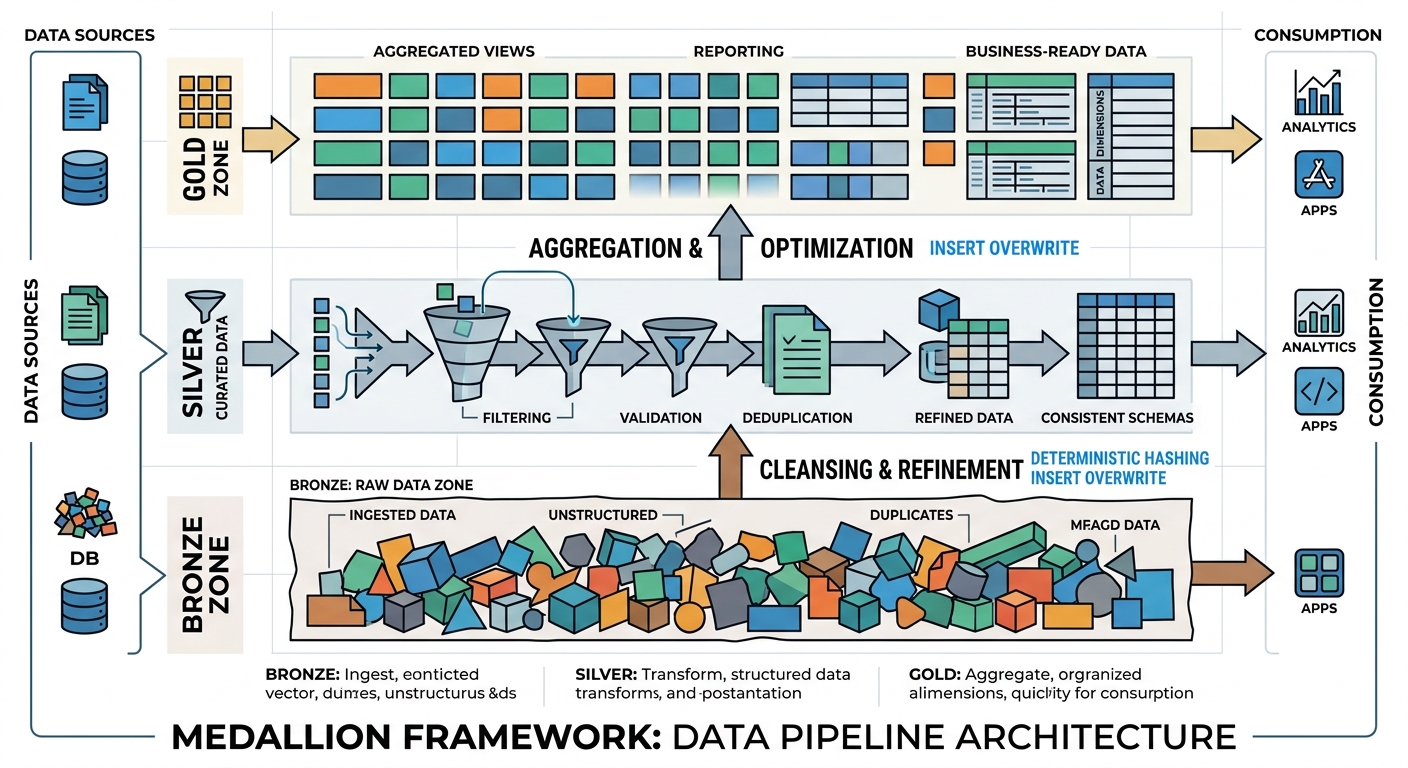
The Medallion architecture (Bronze, Silver, Gold) is the standard, but the way we implement it for idempotency has evolved. Here is my blueprint for resilience:
- Bronze (Raw): Append-only and immutable. I always include
_ingested_atand_source_file. Never touch these files after they land. If you need to “fix” raw data, you do it in Silver. - Silver (Cleansed): This is the deduplication layer. Use the deterministic hashing I showed earlier. I prefer a “Delta” approach here—only store the changes (SCD Type 2) using stable keys.
- Gold (Aggregated): This is where you lean heavily on partition overwrites. Don’t try to be “clever” with incremental updates to a Monthly Active Users (MAU) table. Recalculate the entire month’s partition. Compute is cheaper than the engineering hours required to fix a corrupted aggregation.
I’ve recently started using AI agents to monitor these pipeline states. On platforms like Databricks or Snowflake, you can set up alerts that look for “unexpected variance” in row counts between identical runs. If a rerun produces 1,000,005 rows when the first run produced 1,000,000, an agent flags the non-deterministic logic before it reaches the Gold layer.
Your Idempotency Checklist
Before you push your next pipeline to production, run through this checklist:
- Primary Keys: Does every record have a unique ID derived from source data, or are you relying on database-generated auto-increments? (Avoid auto-increments in distributed systems).
- No Runtime Keys: Have you stripped out all
now(),getdate(), anduuid()calls from the transformation logic? - Partition Strategy: Are you using
INSERT OVERWRITEfor large Gold tables? - Atomic Commits: Does your target storage support atomic commits (like Iceberg, Delta, or Snowflake)? If not, do you have a manual cleanup step on failure?
- The 3-Day Rule: Can you re-run a job from 72 hours ago right now without a single manual
DELETEstatement or SQL intervention?
Building idempotent systems is undeniably harder upfront. It requires more discipline in key design and a deeper understanding of your query engine’s shuffle behavior. But the first time a major cloud region goes down and your pipeline automatically recovers at 3 AM without duplicating a single cent of revenue, you’ll realize it’s the most valuable architectural investment you can make.
How are you handling idempotency in your current stack? Are you still fighting with MERGE statements on multi-terabyte tables, or have you moved to partition-level overwrites? Reach out on LinkedIn or drop a comment below—I’d love to see your benchmarks on MERGE vs OVERWRITE in your specific environment.